
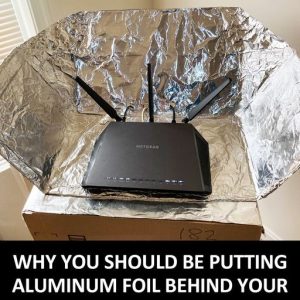
Aluminum Foil Behind your Router for Faster Connection
– Apparently, when more devices are connected to the same wireless network,
the signal becomes weaker. ”Like a sprinkler head spraying water in all directions,” explains McQuiggan.
As a result, wireless signals go to places where they’re not needed and weaken them where they are.
Additionally, obstructions like furniture or walls can impact the signal strength. That’s where the aluminum foil behind your router takes effect.
Placing the aluminum foil behind your router with the shiny side facing outward will reflect the signal.
This allows it to travel more freely yet methodically. Additionally, shaping the aluminum
foil behind your router will give you more control over where the signal travels.
Testing the Theory – Although this hack might seem illegitimate, a research team at Dartmouth studied the theory,
confirming Professor James McQuiggan’s theory. The team reported they created a “3D-printed shape” that was
“covered in aluminum.” And strategically placed it to control where the signal traveled.
They boosted the signal in desired places by more than half. Meanwhile, they decreased the signal in undesired places by just over 60%.
How to Place Aluminum Foil Behind Your Router, What you’ll need: 1 Foot Sheet of Aluminum Foil (Be Sure to Cover the Aentena to the Top)
Note: Some routers won’t have an external antenna. Create a “C” shape with the sheet then place the aluminum foil behind your router.
The shiny side should be facing inside the curve, toward the router.
Fold out the bottom of the sheet to create a stand if it needs extra support to stand upright.
Last, check the connection by going where you’d like to see an increase of signal such as on the couch or in the kitchen.
Type “Google speed test” into your phone or computer browser’s search bar.
Then run the blue “run speed test“ to get a report containing the connection speeds.